Apex Science Publication
01Screen
02Assign reviewers
03Assess reviews
04Decide and produce
Role boundary: Editors work within their assigned journal context. The Editor-in-Chief makes final editorial decisions; Deputy Editors and Scientific Editors provide workflow management and recommendations according to their assignments and permissions.
1

Open the editor dashboard

Log in through the correct journal entrance and select Editor Dashboard. The left navigation groups submissions by action and stage.
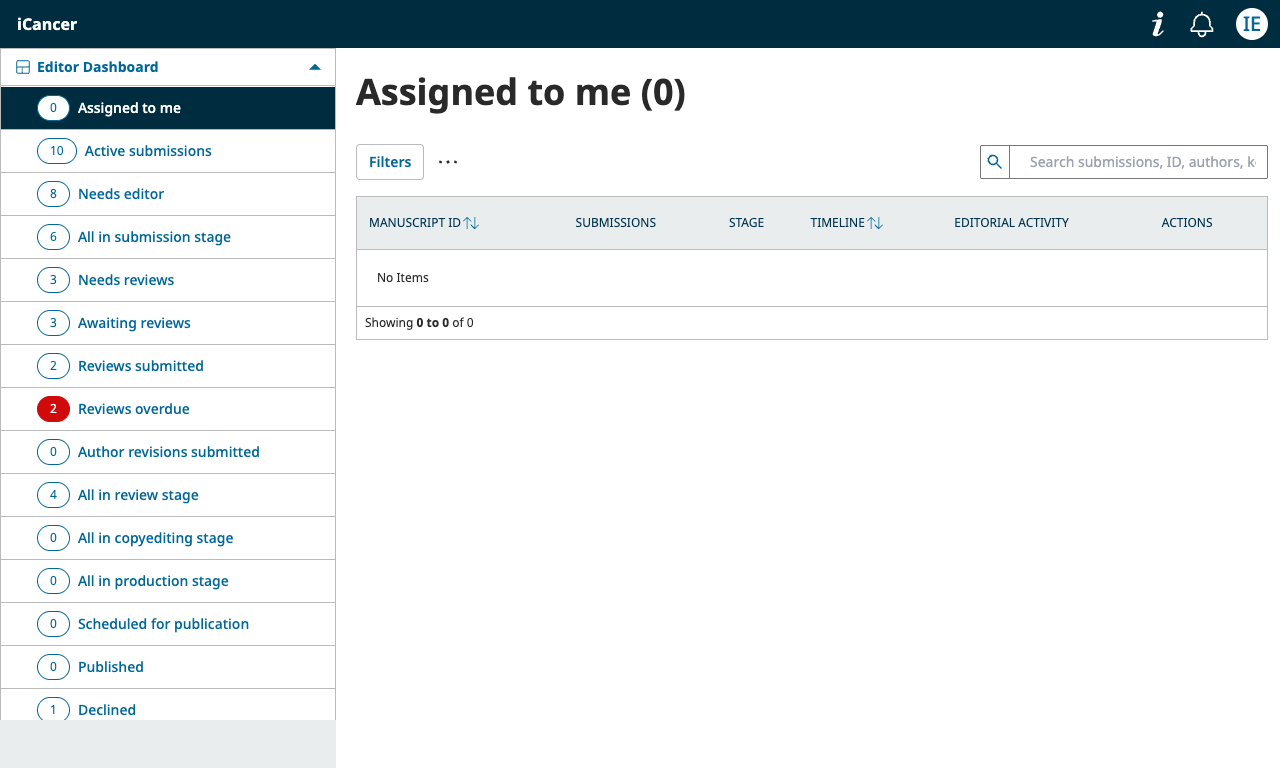
iCancer editor dashboard showing Assigned to me and workflow queue categories
Editor dashboard: use the queues to find assigned, review, revision, and production work.

Start with Assigned to me and then use Needs editor, Needs reviews, Awaiting reviews, or Reviews submitted to focus the next action.
2

Screen a new submission

Open the manuscript and check scope, article type, completeness, ethical documentation, declarations, and basic scientific suitability.

  • Return or decline a submission when it is outside scope or materially incomplete.
  • Move a suitable submission toward external review.
  • Keep internal notes and author-facing comments in the correct fields.
3

Invite and monitor reviewers

Use the reviewer search and assignment tools to invite suitable reviewers. Check expertise, conflicts of interest, availability, and the journal deadline before sending an invitation.

  • Record the review deadline clearly.
  • Monitor Accepted, Awaiting reviews, Reviews submitted, and Reviews overdue queues.
  • Use the activity log to understand who has acted and when.
4

Evaluate the review round

Read the reviewer reports together with the manuscript and author response. Consider the evidence, methods, ethics, reporting quality, limitations, and whether the requested changes are actionable.

Keep decisions evidence-based. A reviewer recommendation informs the editorial decision; it does not replace the editor's independent assessment.

5

Record the editorial decision

Select the appropriate decision, write clear author-facing comments, and keep confidential editorial reasoning in the internal channel. For revisions, specify what must be addressed in the next round.

  • Use the correct review round.
  • Check the decision email preview before sending.
  • Do not include reviewer identities or confidential comments in author-facing text.
6

Manage revisions and acceptance

When a revision is submitted, compare the revised files with the previous round, review the response to reviewers, and decide whether another review round is needed. Once the manuscript meets the journal standard, the Editor-in-Chief can make the final decision.

7

Move accepted work into production

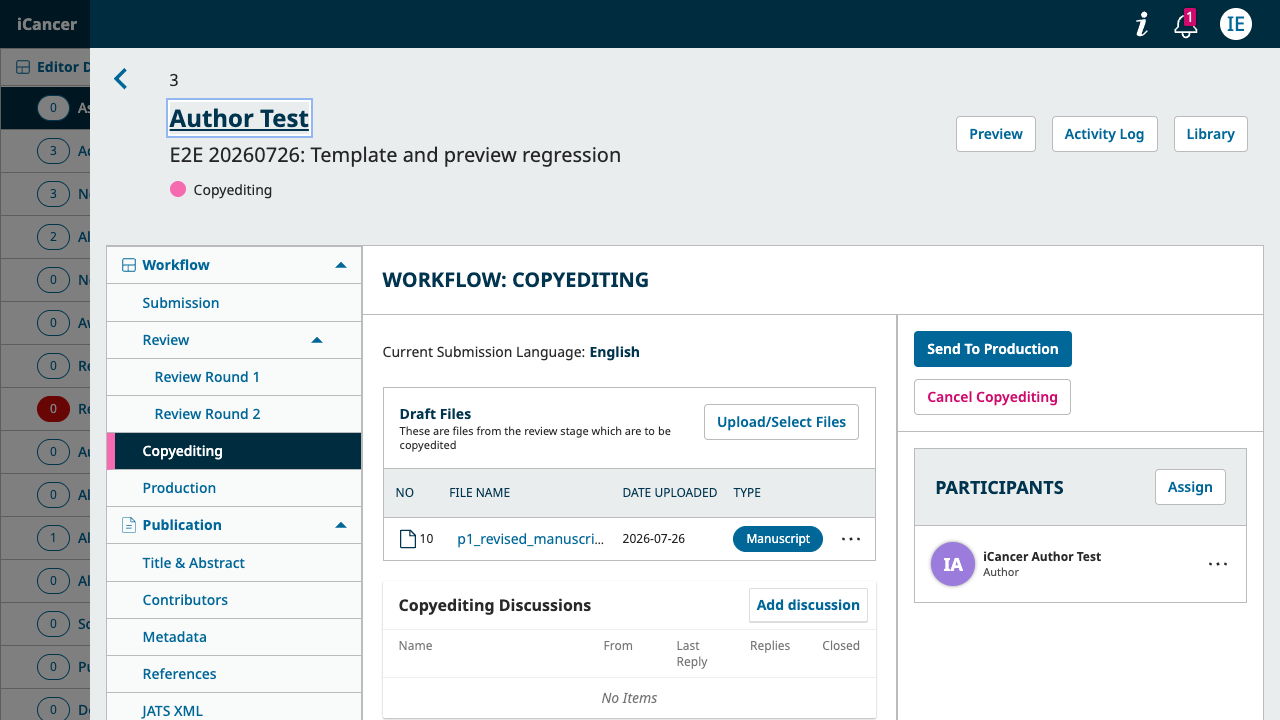
Open the accepted manuscript's workflow and confirm the production files, metadata, contributors, and publication details. Assign the relevant production roles and use the stage controls to move work through copyediting, layout, proofreading, and publication preparation.

Editor manuscript workflow page showing copyediting files, participants, and Send To Production button
Workflow page: production actions and participants are shown within the manuscript record.
8

Close the loop

Before finishing an action, check the manuscript status, activity log, participant assignments, files, and outgoing communication. Use the journal context shown in the header to confirm that you are working in the intended journal.

Editor quick reference

Common queues

Editorial screening

  • Assigned to me
  • Needs editor
  • All in submission stage
  • Author revisions submitted

Peer review and production

  • Needs reviews
  • Awaiting reviews
  • Reviews submitted
  • All in copyediting or production stage